mapplight.com / Guides / Building projection mapping
Building projection mapping: how to map a facade
Updated 6 November 2026 · 5 minute read
Facade mapping is what most people picture when they hear "projection mapping": a church, a town hall or a shop front where the light follows every column, window and arch. Large festival shows use stacks of 20,000 lumen projectors, but a single-storey facade, a chapel front or a shop at night is within reach of one good projector and a laptop.
1. What one projector can cover
| Facade | Typical setup |
|---|---|
| Shop front or house, up to ~8 m (26 ft) wide | One 3,000–5,000 lumen projector |
| Chapel, small church or two-storey front, ~10–15 m wide | One 6,000–10,000 lumen projector, dark surroundings |
| Town hall, cathedral, festival facade | Several high-brightness projectors blended together, usually with dedicated media servers |
mapplight.com drives one projector output per device. For a facade that needs several blended projectors, use show software built for edge blending; see the comparison. For everything up to the middle row, one projector and a browser is enough.
2. Brightness for a facade
What matters is light per square metre, against the light already on the building. A rough rule for a dark street:
ANSI lumens needed ≈ facade area in m² × 50 to 100
A 10 × 6 m front (60 m²) therefore wants roughly 3,000 to 6,000 lumens. Double it if there are street lights or floodlights on the building, and ask for the building's own floodlights to be switched off during the show. Stone and render reflect well; dark brick and glass reflect poorly, so map them darker or leave them out.
3. Throw distance and position
distance = throw ratio × picture width
- A 12 m wide facade with a 1.5 throw ratio lens needs the projector 18 m away. Measure what is actually available: across the street, a window opposite, a parked van, a scaffold tower.
- Central and level gives even brightness and sharp focus across the front. From a steep angle, the near side is brighter and sharper than the far side.
- Higher is better on a street: above head height and above vehicle roofs, so nothing walks or drives through the beam.
- Protect it from rain and dew with an enclosure that leaves the vents free.
4. Permission and safety
- Ask the building owner in writing. Projecting on someone else's building without permission can be treated as advertising or nuisance.
- Check with the council or city for anything on a public street: it may need an event permit, especially if crowds gather or the projector sits on the pavement.
- Never aim at drivers' eyes or into windows across the street, and keep the beam above traffic.
- Cables and power: outdoor-rated, protected by an RCD / GFCI, ramped or taped where people walk.
5. Survey the building
- Take a photo from exactly where the projector will stand, at night if possible.
- Note the features that should each get their own light: columns, windows, arches, a rose window, the door, ledges.
- Note what should stay dark: windows with people behind them, signs, glass that will reflect light back at the crowd.
- Measure the width and estimate the area so you can check brightness and throw distance.
6. Mapping the architecture with mapplight.com
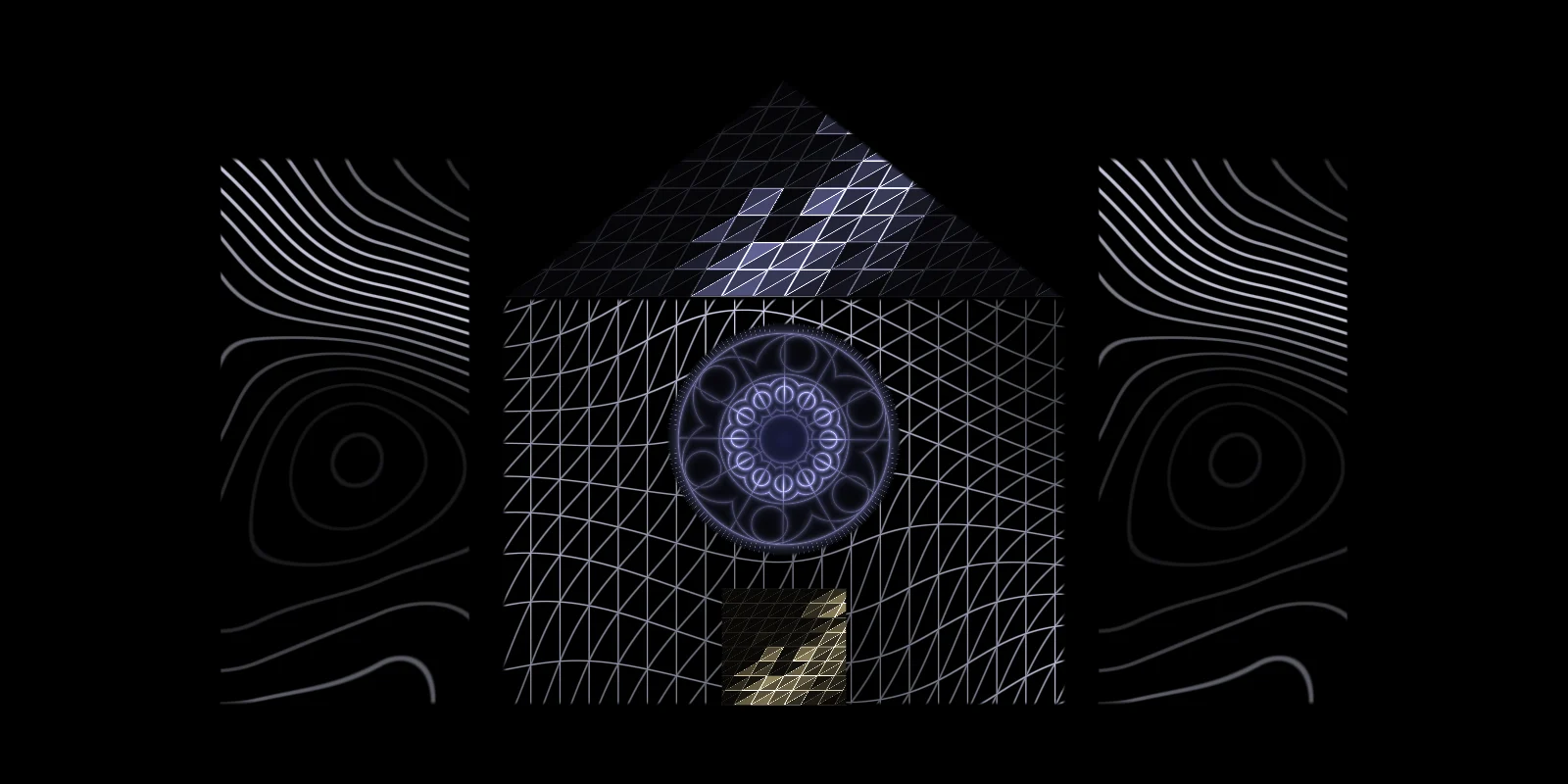
- Add the Building facade template. It creates two towers, the front, a gable, a round rose window and the door. Delete, duplicate and reshape surfaces until they match your building.
- Connect the projector as an extended display, open the projector window and make it full screen. Turn keystone correction off on the projector.
- Turn on the calibration grid and drag each corner onto the real edges. Use quads for walls and columns, circles for round windows, triangles for gables. Welded corners keep shared edges together.
- Curved surfaces such as a dome or a rounded bay window can use mesh warp (Pro), which bends the picture with a grid of control points.
- Assign visuals per surface: line art on the structure, something brighter on the features you want people to notice.
- Save looks and set auto-cycle so the show runs by itself, or switch by hand with the number keys.
7. Content that reads from the street
- Follow the architecture. Outlines, edge chases and patterns that respect each surface make the building look alive. A single video across the whole front makes it look like a screen.
- Use one colour family per look. The facade demo uses blue line art with a warm door as the single accent.
- Go big and slow. Fine detail disappears at 20 m. Large shapes and slow movement read better and are easier to watch.
- Built-in visuals that suit facades: Contour lines, Wire mesh, Neon edge chase, Rose window, Stained glass, Gilded ornament, Flow lines, Lit facets.
- Your own media (logos, artwork, video) can go on any surface.
FAQ
How many lumens do I need to project on a building?
Roughly 50 to 100 ANSI lumens per square metre of facade on a dark street, and about double with street lights nearby. A 60 m² front wants 3,000 to 6,000 lumens.
Do I need permission to project onto a building?
Yes: from the owner, and often from the local council or city if the show is on a public street or draws a crowd. Get it in writing.
Can I map a building with one projector?
Yes, for fronts up to about 10 to 15 metres wide with a bright projector and dark surroundings. Larger facades need several projectors blended together.
Can I project onto windows?
Clear glass lets most of the light through, so the window looks dark from outside. Map the frames, or hang blinds or a white sheet inside the windows to give the light a surface.
Does mapplight.com support edge blending several projectors?
No. It drives one projector output per device. For blended multi-projector facades, dedicated software such as MadMapper or Resolume Arena is the right tool.
Keep reading
Best projector for projection mapping
How to choose a projector for projection mapping: real ANSI lumens for each job, throw ratio and distance, laser vs lamp, inputs, and what to buy at each budget.
Christmas house projection
Christmas projection on your house: projector vs lights, mapping snow, candles and string lights onto the walls and windows, running it all season, and a New Year switch.
Projection mapping software compared
A plain comparison of projection mapping software in 2026: mapplight.com, MadMapper, HeavyM, Resolume Arena and Lazy Lighting. Platforms, pricing model, learning curve and who each one suits.